
Imagine a world where your Bitcoin isn’t just sitting idle in your wallet but actively working for you, earning rewards while still being available for trading and other financial maneuvers. Sounds like a dream, right? Well, welcome to the future of Bitcoin with liquid staking!
Liquid staking has been a revolutionary concept for Proof-of-Stake (PoS) blockchains, and now it’s making its way into the Bitcoin ecosystem. This guide will walk you through the ins and outs of Bitcoin liquid staking on the testnet, helping you unlock the full potential of your BTC.
So, let us put some faucets under stress and load some test stash for a better tomorrow. And if you don’t understand what I just said, chuck it. Sometimes it is really hard for me to contain the excitement.
Bitcoin Liquid Staking Testnet Guide
Bitcoin, the granddaddy of all cryptocurrencies, is stepping into the liquid staking arena. Yes, you heard it right. Liquid staking, which has been a game-changer for PoS blockchains, is now making waves in the Bitcoin ecosystem. So, what’s the deal with Bitcoin liquid staking, and how can you get started on the testnet? Let’s dive in.
What is Liquid Staking?
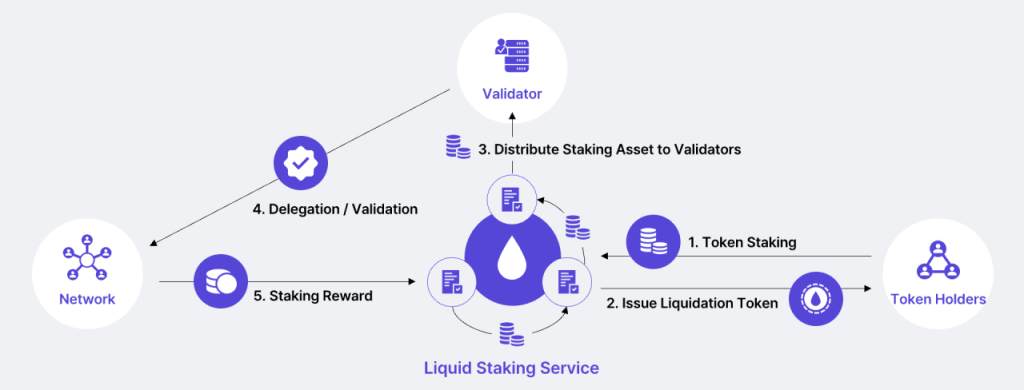
Liquid staking, also called tokenized staking, is a method that allows individuals to stake their assets and receive rewards while maintaining liquidity.
It involves staking a cryptocurrency asset to secure a blockchain network and earn staking rewards. However, instead of the staked assets being locked up for a specific period, individuals receive a liquid representation of those staked assets in the form of tokens.
These tokens can be freely traded or used in decentralized finance (DeFi) applications, allowing individuals to utilize their staked assets for other financial opportunities.
Why Liquid Staking for Bitcoin?
Bitcoin has traditionally been a Proof-of-Work (PoW) blockchain, where mining is the primary method of securing the network.

However, with the advent of liquid staking, Bitcoin holders can now participate in staking without giving up liquidity.
This means you can stake your BTC, earn rewards, and still have the flexibility to trade or use your staked assets in DeFi applications.
I know this sounds alien, but trust me, chads at PStake have thought this through. You can learn more about ‘how is this even possible’ and ‘why is this the only way forward in BTC ecosystem’ from here.
Getting Started with Bitcoin Liquid Staking on Testnet
Honestly, if you are doing this for a while, it is a cakewalk. For others, here’s a step by step guide.
Step 1- Set Up Your Wallet:
First things first, you need a wallet that supports Bitcoin liquid staking. For our testnet, that happens to be OKX. Images below will help you understand the setup process.
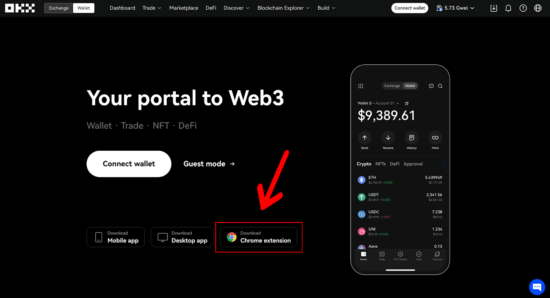
- Head over to the official OKX Wallet website and click “Download Chrome Extension
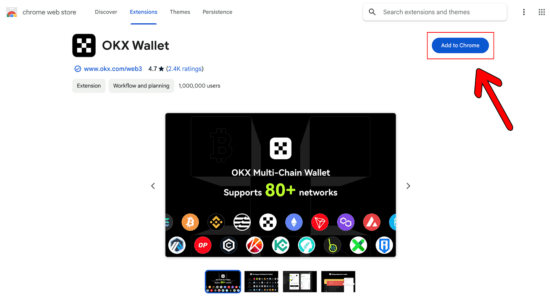
- On the following Google Page, click “Add to Chrome”:
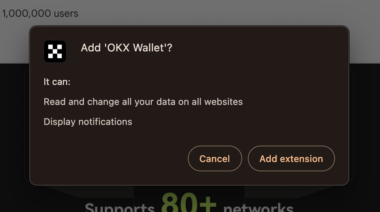
- Then, click “Add Extension”:
- Once installed, you will be greeted with the following notification, requesting to create your wallet. Let’s go ahead and click “Create Wallet”:
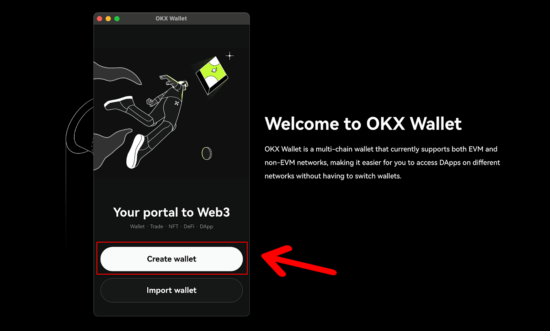
- Select “Seed Phrase,” or choose hardware wallet if you would like to connect your Ledger or Trezor:
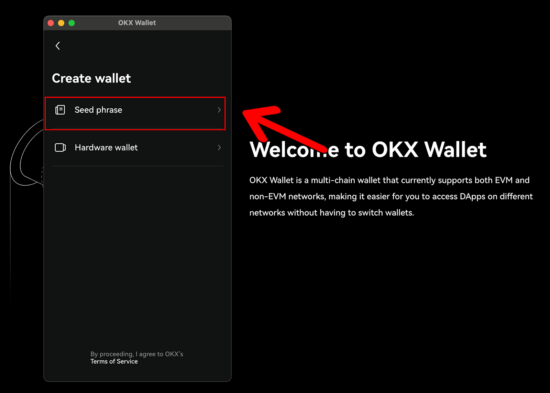
- On the next screen, set your password:
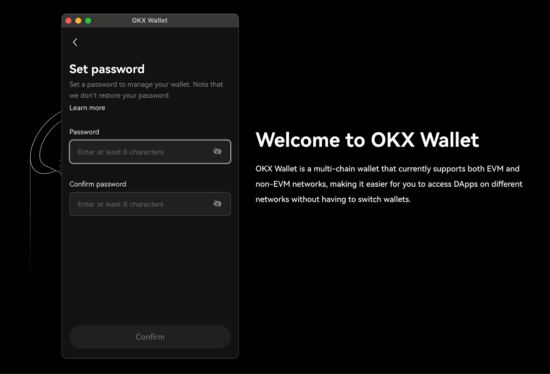
- Then, be sure to note down your seed phrase and keep it in a secure location:
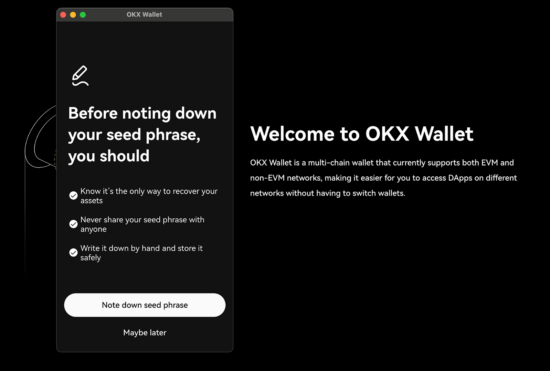
Step 2- Know your Signet Bitcoin Address:
The pSTAKE Bitcoin Liquid Staking solution uses the native Segwit address format, which begins with a TB1Q address. Therefore, we will also need to point the wallet to the correct testnet network before connecting to the pSTAKE Bitcoin Liquid Staking dApp.
Let’s first start by adding the sBTC asset to our wallet and pointing it to the right network before loading it with sBTC tokens.
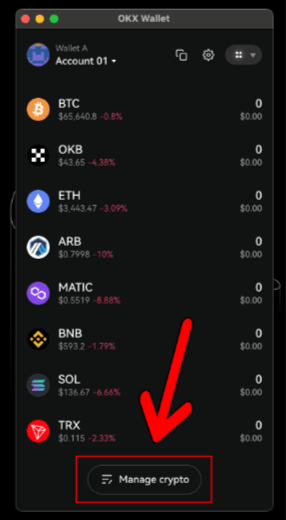
- First, head to your wallet and scroll to the bottom of the dashboard and click “Manage Cryptos”
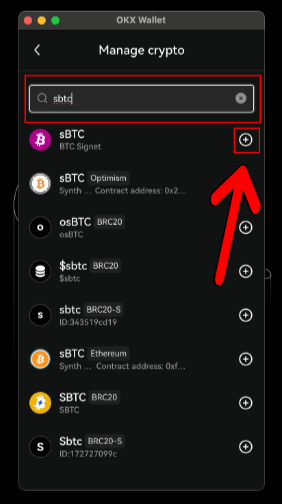
- Here, we can search for “sBTC” and click the “+” icon to add it to our wallet:
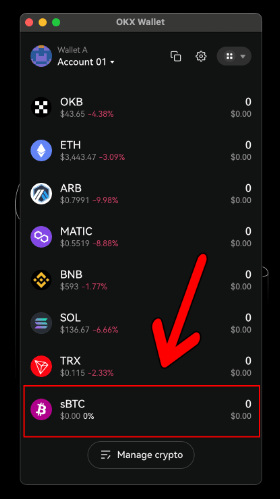
- Once added, you will see the asset in your list of tokens. Let’s go ahead and click sBTC so we can select the correct default address type for the testnet:
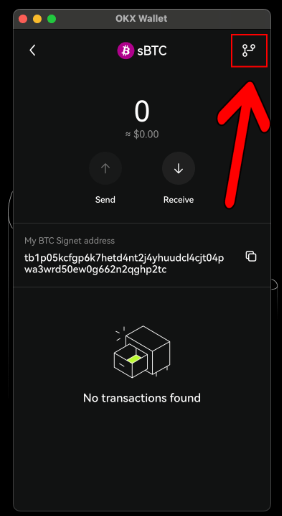
- Once on the sBTC page, let’s click the icon in the top right corner to set the default address format:
- Here, we need to look for the Native Segwit address that starts with “tb1q” which is compliant with the pSTAKE Bitcoin Liquid Staking testnet network:
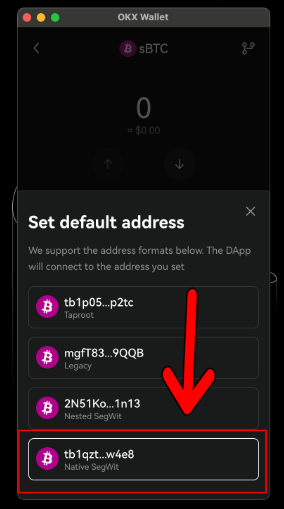
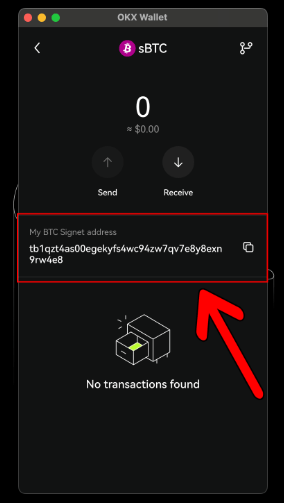
- Once selected, your address will change to a tb1q address. This will be the address required to send sBTC tokens for testing, so let’s copy the address for the next step:
Step 3- Acquire sBTC:
You’ll need some sBTC to get started. You can obtain sBTC from a faucet.
Either you can head over to signetfaucet.com. This method took 8-10 tries before I could get my hands on some sBTC.
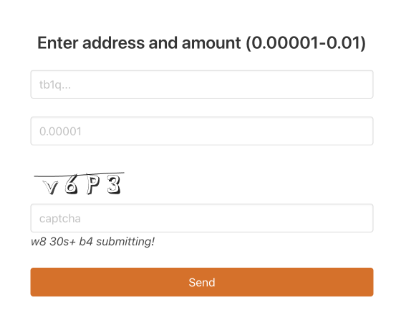
Or, you could simply hop on to Babylon’s discord. There is a channel called faucet which can help. For me personally, it failed every single time citing busy servers as the reason.
Step 4- Connect and Stake:
Once you have your sBTC, connect your wallet to the pstake staking platform.
You may need an invite code to enter. The invite code will be refreshed every 24 hours and announced on the pSTAKE Telegram and Discord, providing everybody with an equal chance to have the opportunity to test the Bitcoin liquid staking solution.
So, be sure you’re part of the community to have the chance to get access to the testnet.
- Navigate to the staking section of the platform and deposit your testnet sBTC.
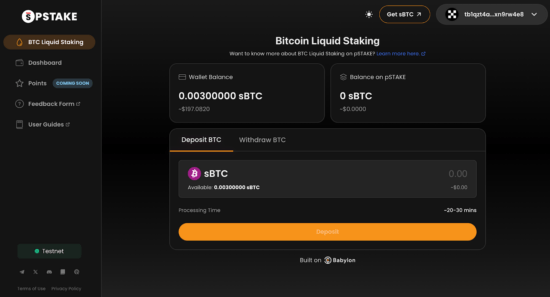
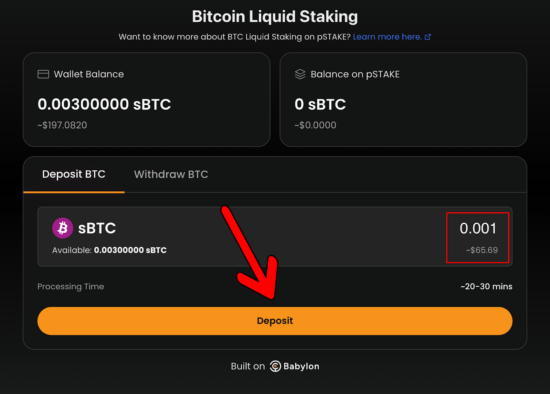
- To make a deposit, enter the amount of sBTC to deposit in Box F (mentioned above) and hit “Deposit Funds.” Please note that there is a minimum deposit amount of 0.0001.
- For this tutorial, we will enter 0.001 sBTC and hit Deposit:
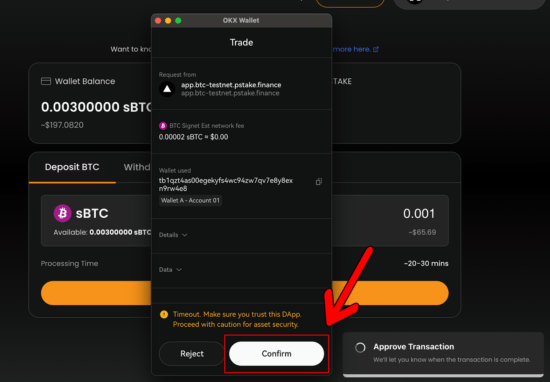
- A wallet notification will appear, asking you to confirm the deposit. Please hit “Confirm”:
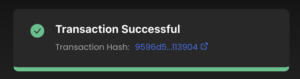
- You should see the following notification appear on the dashboard to confirm the transaction has been executed. Please click the hyperlink in the notification to track the status of your deposit:
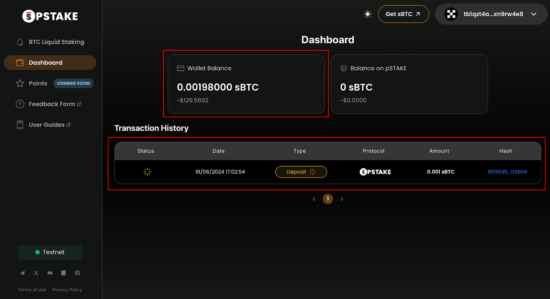
- You can also track the status of your deposit on the “Dashboard” section – located on the left menu.
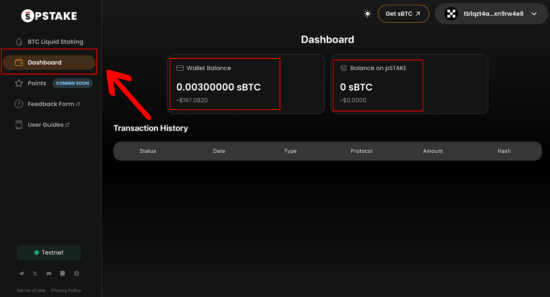
- After one confirmation on the blockchain, the dashboard will update your “Wallet Balance” and will display the deposit in the “Transaction History”
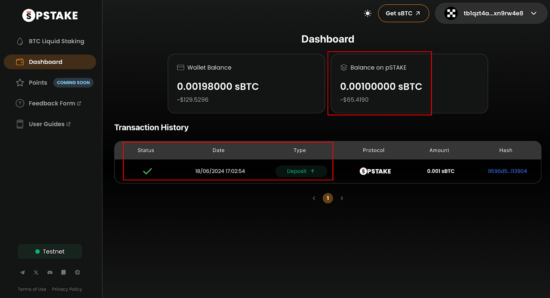
- After three block confirmations, your deposit will be displayed in “Balance on pSTAKE”:
Benefits of Bitcoin Liquid Staking
In the current version (V1) of this testnet, there is no yield. However, in the upcoming V2, pstake is planning to launch a product where you can deposit BTC into Babylon’s Bitcoin shared-security protocol, which will generate a yield through economic security.
This yield will be distributed to pSTAKE depositors.
Unlocked Liquidity: Liquid tokens can be traded, transferred, and used in lending or as collateral for borrowing in DeFi protocols instead of remaining locked for a fixed period.
As a result, the value and utility of the underlying cryptocurrency increase, thereby boosting liquidity.
DeFi Composability:
By serving as derivatives for the staked tokens, LSTs are usable across countless DeFi platforms. Specially when this derivative is of BTC, it adds an additional weight of security to the PoS blockchain.
Reward Opportunities:
This form of staking reduces the opportunity cost of staking by allowing users to earn staking rewards while still leveraging the value of their staked tokens. Thus, the LST can be used on other platforms to earn additional rewards on the same investment.
It is time to change BTC HODL narrative for good. A currency without velocity is no good for the ecosystem.
Conclusion:
Liquid staking on Bitcoin is an exciting development that opens up new possibilities for BTC holders. By enabling staking without sacrificing liquidity, it combines the best of both worlds.
As the ecosystem evolves, we can expect to see more innovative applications and integrations emerge, making liquid staking a staple in the crypto world.
Got questions? Want to take it to the next level? Reach out to me using your preferred platform from the links below.
Until next time, happy staking!